Making Nextcloud Talk Highly Available: Why Video Calls Don't Scale Like Web Apps


💬 Making Nextcloud Talk Highly Available: Why Video Calls Don't Scale Like Web Apps
For most web services, "highly available" is a solved problem. Run two replicas behind a load balancer. When one falls over, the other picks up the slack. You write a Helm chart, you set replicas: 2, and you go to lunch.
For real-time video, it doesn't work like that. We learnt this the hard way scaling the Nextcloud Talk High Performance Backend (HPB) on our Kubernetes cluster. What followed was a quietly humbling few weeks of "wait, why is the video gone?" debugging that taught us a lot about how stateful, real-time media is fundamentally different from your average HTTP service.
This is the story of how we got there. It's a write-up for people who already know what HA means and don't need an explainer on Kubernetes pods, but who would rather not wade through Janus internals or read 200 lines of nextcloud-spreed-signaling config to follow along.
What We Were Trying to Solve
Nextcloud Talk handles small calls (under 5 people, give or take) with peer-to-peer WebRTC. Each participant connects directly to every other participant. It's elegant and it works, right up until you want to host a six-person team meeting or someone joins from a coffee shop with a hostile NAT.
For everything beyond that, Nextcloud Talk uses the High Performance Backend, or HPB. The HPB is a cluster of components that act together as a media router; instead of every participant streaming video to every other participant, they all send their stream once to the HPB, and the HPB fans it out. It's the same trick Zoom and Google Meet use.
The problem: a single HPB pod is a single point of failure. When it crashes, every active call dies. When the cluster needs maintenance and the pod gets evicted, every active call dies. When a busy six-person call pushes CPU into the red, the bottleneck is on one pod and everyone's video starts looking like a Picasso painting.
So we wanted to run more than one. Two replicas, ideally three later. Standard HA stuff. How hard could it be?
Why Video Doesn't Scale Like Web Pages
Here's the thing nobody tells you in the load-balancer tutorials. When you scale a web app horizontally, each request is independent. Alice's HTTP request to Pod A doesn't need to know anything about Bob's HTTP request to Pod B. They're strangers passing in the night.
Video calls are not like that. Alice and Bob need their video streams to meet somewhere. If Alice is connected to Pod A and Bob is connected to Pod B, the video that Alice publishes has to physically reach Bob. Either Alice has to also connect to Pod B (which kind of defeats the point of load balancing), or the two pods have to talk to each other and pass the streams across.
There are basically two ways out of this:
- Sticky sessions. Use a smart load balancer that always routes everyone in the same call to the same pod. This works, but it means a single big call can still max out one pod, and if that pod dies the whole call dies. You're not really highly available; you're just less single.
- Cross-pod media routing. Let participants land wherever, and have the pods coordinate so the video flows between them. More complex, but actually solves the problem.
We wanted option 2.
The Naive Approach (And Why It Looked Like It Was Working)
The signaling server that sits in front of Nextcloud Talk's HPB has a clustering mode. You can run multiple instances, and they'll form a virtual cluster using a message broker (NATS) for pub/sub events and gRPC for direct lookups between pods. It even uses mTLS to authenticate the connections, which is lovely.
We had this configured. Pods could see each other. Sessions were synchronised. When someone joined a room on Pod 0, Pod 1 knew about it. The dashboards looked beautiful.
The video still didn't work.
What we missed is that the signaling cluster only synchronises signaling state. It knows who's in which room. It can look up sessions across pods. But it doesn't actually route media. When Alice on Pod 0 wanted to subscribe to Bob's video, and Bob's video was being handled by the Janus server running on Pod 1, the signaling cluster didn't have a way to ask Pod 1's Janus to do anything. Each pod's Janus was sitting there in splendid isolation, talking to nobody but its own local signaling server.
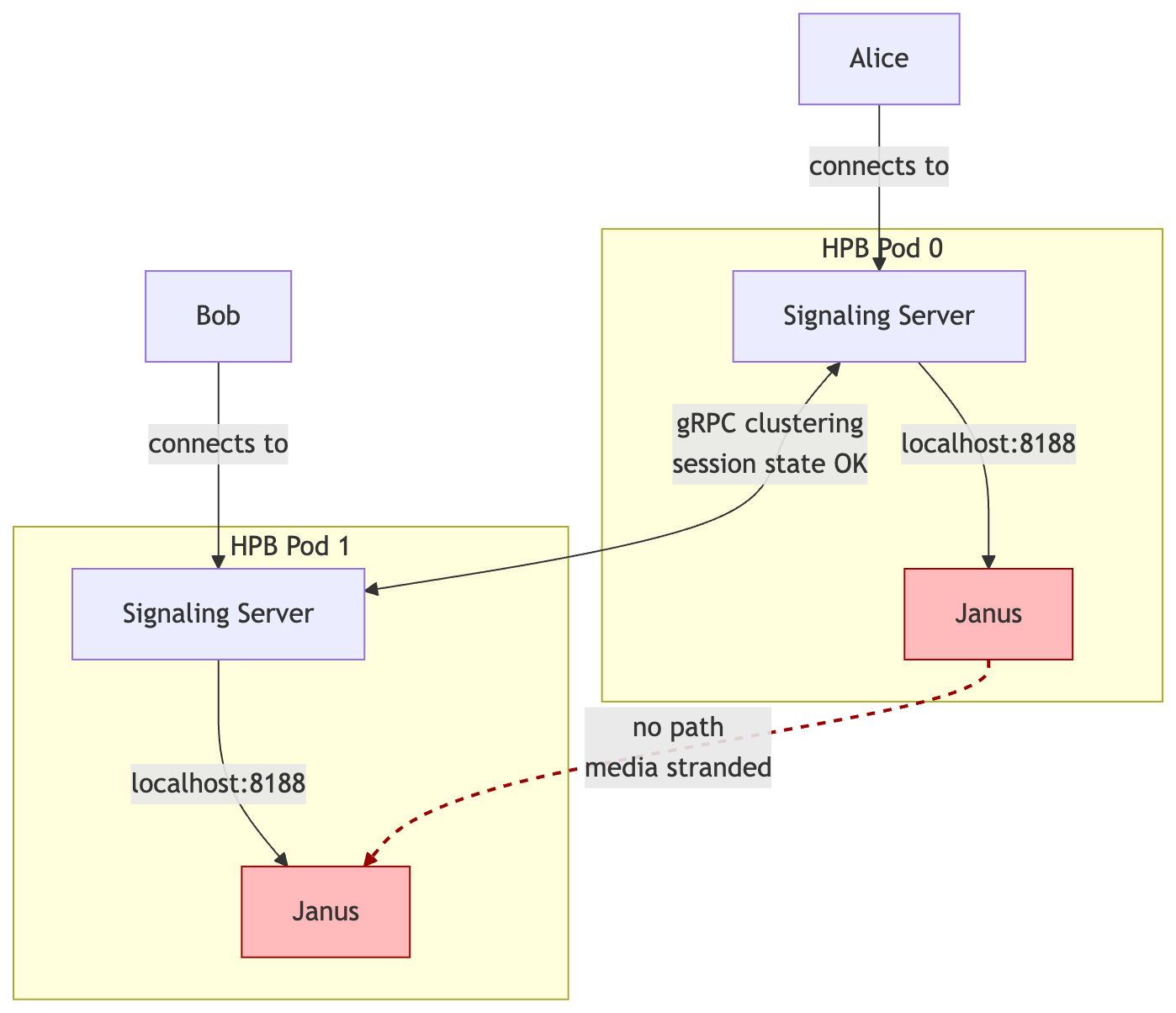
The error message looked something like this:
Could not create MCU subscriber: context deadline exceeded
Which is signaling-server-speak for "I have no idea how to reach the thing you're asking me about, and I've given up waiting."
The Fix: Letting the Pods Actually Talk to Each Other
Buried in the upstream docs is a different mode for the signaling server's media connection. Instead of mcu.type = janus (where each signaling server talks directly to its own local Janus), there's mcu.type = proxy. In proxy mode, the signaling server doesn't connect to Janus directly; it connects to a small proxy process that wraps Janus and exposes it over HTTP.
The clever bit: a signaling server can connect to multiple proxies at the same time. So Pod 0's signaling server can have direct lines to both Pod 0's Janus and Pod 1's Janus, via their respective proxies. When Alice wants Bob's video, Pod 0's signaling server just asks Pod 1's proxy to set things up, and Pod 1 obliges.
This also lights up Janus's "remote streams" feature, which lets the two Janus instances genuinely forward media between each other for cross-pod subscribers. Now the video flows like it's supposed to.
What Our Architecture Looks Like
Here's the picture, simplified.
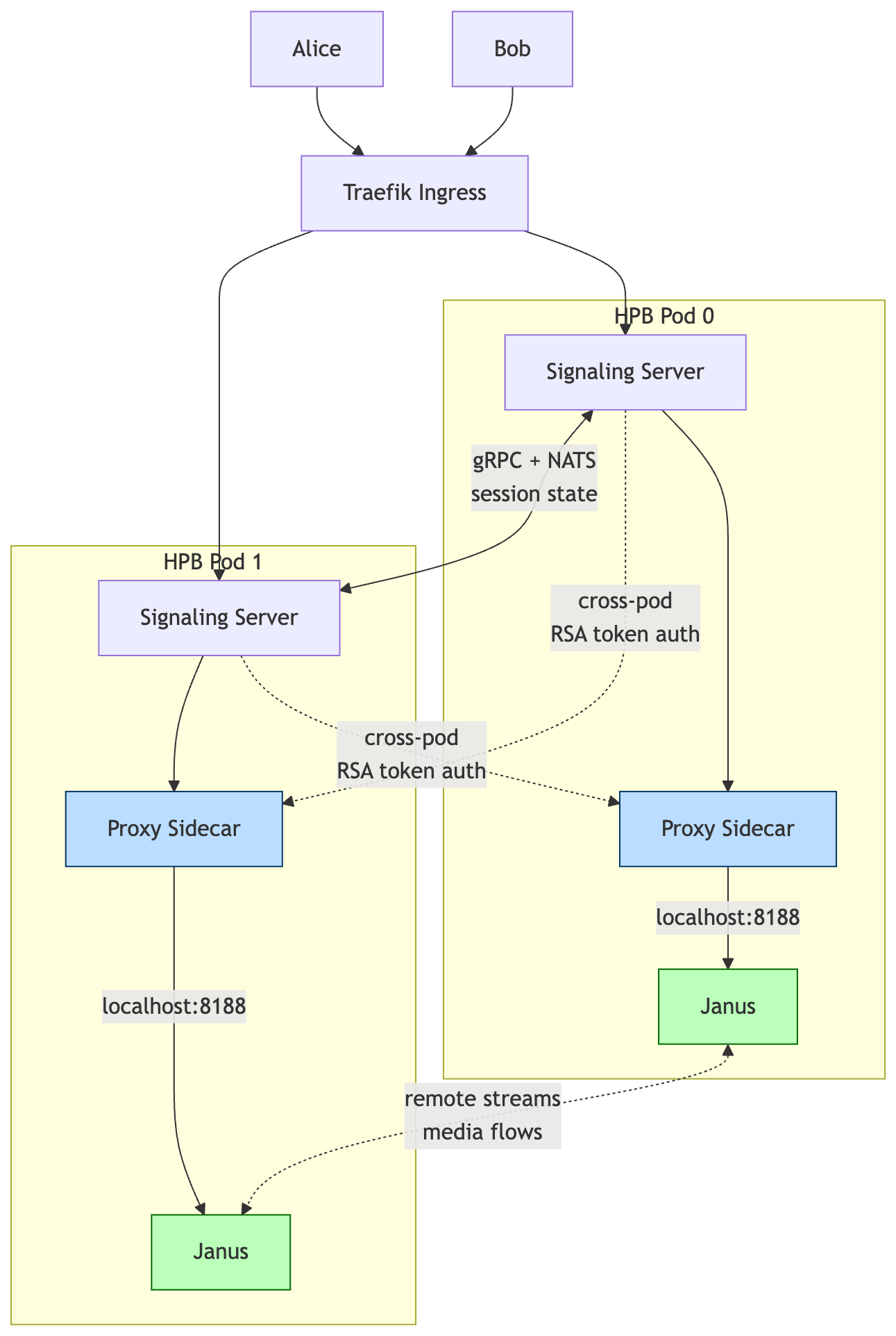
The proxy sidecars are the new bit. They give every signaling server a way into every Janus, and the Janus instances can now forward media between themselves.
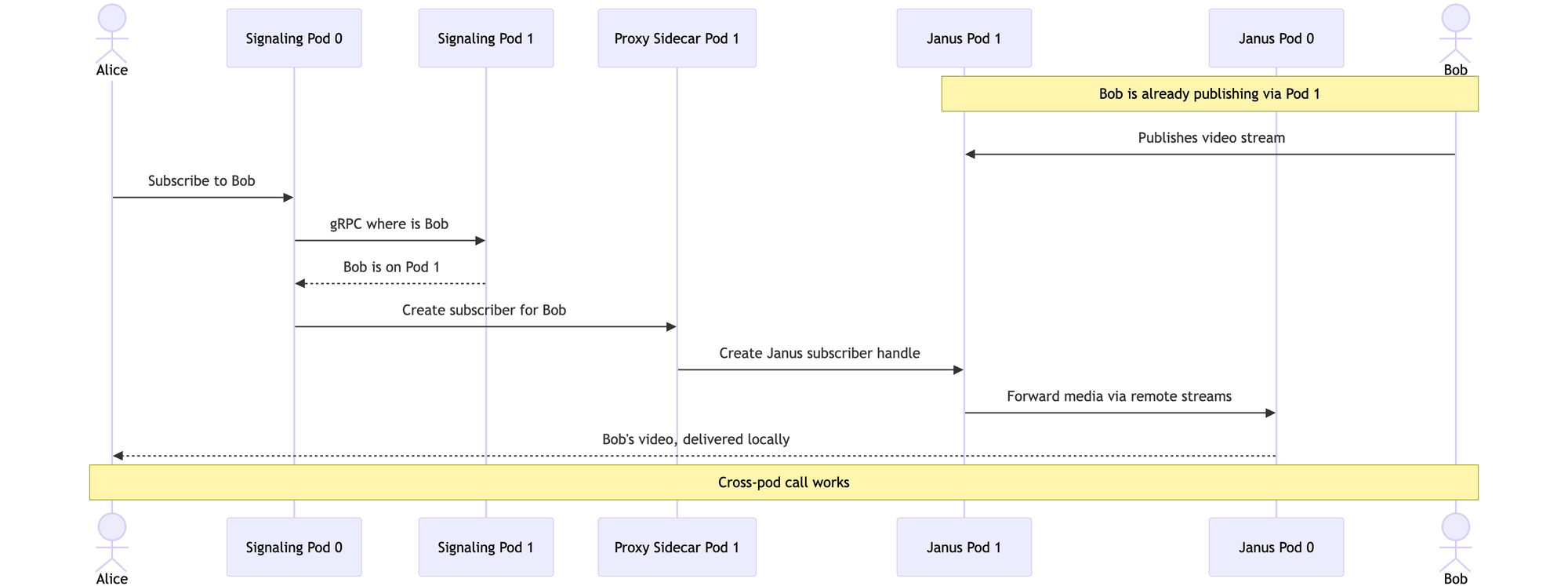
If you want to see the choreography in motion, here's what happens when Alice (on Pod 0) wants to watch Bob's video (Bob is publishing via Pod 1):
Each pod runs three containers:
- The main HPB container with the signaling server, Janus, and a local TURN server (eturnal), all bundled together
- A proxy sidecar that wraps the local Janus and exposes it for the other pods to talk to
- The Linkerd sidecar for service mesh mTLS
The pods are deployed as a StatefulSet so each one has a stable DNS name (nextcloud-hpb-0.nextcloud-hpb-headless, nextcloud-hpb-1.nextcloud-hpb-headless, and so on). At startup, each signaling server reads how many replicas are running and builds a list of all the proxy URLs dynamically, so adding a third pod later is just a matter of bumping a number.
For authentication between the signaling server and the proxy, we use RSA keypairs (one for the signaling server, one for the proxy, both stored in Vault and synced into Kubernetes secrets via External Secrets Operator). The gRPC clustering still runs alongside, with TLS certs issued by cert-manager from Vault PKI, rotating yearly. It's a lot of moving parts, but each piece is doing exactly one thing.
The Bumps We Hit Along the Way
A few of these are worth calling out, partly because they cost us hours and partly because someone Googling the same error messages might stumble on this and save themselves a Friday afternoon.
Linkerd was double-wrapping our gRPC connections. Our gRPC traffic between pods already has its own TLS (from Vault PKI). Linkerd, being helpful, was wrapping that in another layer of mTLS, which caused silent handshake failures. The fix was to add port 9090 (and later 8090 for the proxy) to Linkerd's skip-inbound-ports annotation, telling the service mesh to leave those ports alone.
The proxy needs two separate keypairs. We tried at first to use one keypair for everything. The proxy actually needs its own private key (so it can sign responses) and the signaling server's public key (so it can verify incoming tokens). Four key files in total, neatly stored in Vault under secret/nextcloud-hpb/proxy-auth.
StatefulSet per-pod DNS only works for one service. We thought we'd create a separate headless service just for the proxies and get nice DNS names like nextcloud-hpb-0.nextcloud-hpb-proxy-headless. Kubernetes does not do that. Per-pod DNS only works through the service named in the StatefulSet's serviceName field. We rolled it back and just used the existing nextcloud-hpb-headless service, since the proxy is on the same pod anyway.
Sed injection vs heredoc whitespace. A small one, but the kind of thing that bites at 11pm. Our first attempt to inject the proxy URLs into the config used sed -i to find a line with leading whitespace. The heredoc that generated the config had stripped the whitespace, so the regex never matched. Fix: build the URL list before the heredoc and just interpolate it directly. About 15 lines shorter and infinitely easier to read.
In total we did about seven rounds of "deploy, find error, fix, redeploy" before everything was happy. Each round taught us something the docs hadn't mentioned.
What Changed
After deployment, we ran a five-device test call to confirm the whole thing actually worked. The numbers were better than we expected.
- CPU spread across pods: 233m + 195m total, instead of 538m on a single pod. Roughly 80% less peak CPU per pod, which gives us a lot of headroom for bigger calls.
- SRTP errors: 1 in the test session, vs 64 in a comparable single-pod session. Dramatically less media corruption.
- Video bitrate: we can now push 2.5 Mbps per publisher, up from about 768 Kbps. Visibly sharper video for everyone on the call.
- Pod failure handling: when we deliberately killed one pod mid-call, the remaining pod kept the call alive. New participants could still join. Existing participants on the killed pod had to reconnect, but they weren't locked out.
That last point is the one that mattered most. The whole reason we did this was so a pod eviction during a Tuesday morning meeting wouldn't ruin someone's day.
Looking Back
If I could send a note back to the version of myself who started this project, it would say:
"Highly available" means different things in different contexts. Naive replica scaling works for stateless web apps. For stateful real-time media, the application's clustering model matters as much as the infrastructure. Read what your software actually clusters before you assume replicas: 2 will save you.
Read the upstream docs slowly. The mcu.type = proxy setting was right there in the documentation the whole time. We didn't recognise it as the answer until we'd thoroughly understood what the gRPC clustering did and didn't do. There's no shortcut for actually understanding the system.
Service meshes and app-level TLS don't always get along. Linkerd's transparent mTLS is one of the best things about it, until your app already has its own TLS and the two layers fight.
Automate verification. We wrote a small test script (38 health checks across the whole stack) so we could confirm things were working in a few seconds, not minutes. When you're doing seven rounds of debugging in an afternoon, that adds up to real time saved.
What's Next
We're running two replicas in production right now, and it's been steady. The next step is bumping to three replicas (we need to verify a few NATS clustering quirks first), and then we'll be looking at multi-region TURN to reduce latency for clients outside the Netherlands. Janus 1.1's "remote streams" feature is also something we want to lean on harder once we've got more data on how it behaves under real load.
If you're running Nextcloud Talk yourself and bumping into similar walls, drop us a line. The setup isn't trivial, but it's also not magic; it just took a while to find the right combination of upstream features and config bits. Happy to compare notes.
Junovy hosts EU-based, open-source business software for small businesses and independent professionals. Nextcloud Talk is part of the Junovy Cloud suite, alongside Nextcloud and Collabora.